

How Can We Help?
AAC Membership Process Workflow
The Agility Association of Canada, (AAC); founded in 1988; Is committed to promoting inclusive, competitive dog agility at a local, regional, national, and international level, for all handlers and dogs without regard to pedigree.
1.1 AAC Registration & Event Management System
The Agility Association of Canada (AAC) has a membership registration system (MRS) where users log in, create a profile and apply to become a member. Membership provides some benefits such as registering their dogs, the ability to become a judge and more.
1.2 Purpose of this Document
The Purpose of this document is to map out and define the workflow on how an MRS system user becomes an AAC member including year over year renewals.
2. Timelines
2.1 Membership year
The AAC Membership runs from Jan 1st to Dec 31st each year regardless of when the member purchased the membership.
2.2 Membership renewal period
AAC opens Membership renewals on Nov 1st each year. All renewals are made for the following year.
2.3 Membership Grace period.
Number of days (set by AAC) into the new year that a member can still login and renew their account. After the grace period, all accounts that have not renewed get set to a “membership status” of expired and their “membership type” set to Non-Member
3. Account Types
3.1.1 Individual
3.1.2 Club
4. Membership Types
4.1.1 Non-Member
This Membership type identifies new users who are applying for AAC Membership for the first time or for past members who have let their membership expire and need to re-apply for membership.
4.1.2 Provisional
Once a Non-Members has been approved by the AAC board, their membership type changes from Non-Member to Provisional. This process adds or updates a new Provisional Date. Membership is Provisional until 366 after the provisional Date when it will become Regular.
The MRS will run a check every day at 2:00am:
Membership Type change – Provisional to Regular when Provisional Date > Provisional Date +365.
4.1.3 Regular
A Member becomes Regular 366 days after their Provisional Date
4.1.4 Associate
An Associate member is a user who is under 18 years old or lives in Country outside of Canada. When a new member applies for Membership the MRS will calculate age (if provided) and check the region, if either of these conditions are positive, the Membership type will be set to Associate.
The System will check daily (2am) to see if any Associate members who reside in Canada have turned 18 and if so, it will check the users provisional date and if greater than 365, set their Membership Type to Regular and if less than 365, set their membership Type to Provisional.
4.2 Membership Status
4.2.1 Awaiting Approval
All new membership applications that have been paid remain in this status until the AAC Board approves them as members. When approved the AAC Admin under the Pending user’s section of the MRS selects “Approve” which then changes their Membership type to Provisional and their Membership Status to Good Standing.
4.2.2 Good Standing
Provisional Members who have been approved by the board and Regular members who are current with their renewal will have a Membership Status of Good Standing.
4.2.3 Not in Good Standings
A member’s Membership Status will change from Good Standing to Not in good standing if the member hasn’t renewed before the end of Jan (Jan 31) and is therefore now in the AAC grace period until March 1st.
4.2.4 Expired
The membership Status will change from Not in Good Standing to Expired when the grace period has passed. (>March 1st). This will also change the Membership type from Regular or Provisional to Non-Member.
5. Approval / Payment Status
5.1.1 Approved
A Payment status of Approved means that the member can renew their membership for the upcoming year.
5.1.2 Cancel
Not used will be removed
5.1.3 Conditional
Not used will be removed
5.1.4 Expired
Membership Account has not renewed and is now past the grace period.
5.1.5 Pending
Not used will be removed
5.1.6 Rejected (
Not used will be removed
5.1.7 Renewed
When a user with a Membership Type of Regular or Provisional successfully renews their membership, the Payment status will get set to Renewed
5.1.8 Renewing
For Membership Types of Regular or Provisional, to identify when the membership payment is still in process. This could be a pending cheque or an order still going through the PayPal process. Once the payment has been completed, the Payment Status will be updated to Renewed.
5.1.9 Paying
The same as renewing but for users with a membership type of Non-Member.
6. Renewal Process
6.1 Renewal Conditions
Users will be given an option to renew their AAC membership if the following conditions are met.
Account Type = Individual and Membership status = Regular or Provisional or Associate and Membership Status = Good Standing or Not in Good standing & Payment status = Approved
6.2 Renewal Events
6.2.1 Enable Renewal
The AAC Renewal process opens on Nov 1st. To enable the ability for users to renew the following action takes place in the MRS.
On Nov 1 (2am) set Payment status to Approved if Membership Type = Regular or Provisional or Associate and Membership Status = Good Standing
Note, this action only takes place once per year.
6.2.2 Renewal Completed
At any time, if Membership type = Regular or Provisional or Associate – Once payment is made, set Membership Status to Good Standing, and set Payment Status to Renewed.
6.2.3 Grace Period
Dec 31 +30 days – if Membership Type = Provisional or Regular or Associate with a payment status of Approved. The Membership Status changes from Good Standing to Not in Good Standing.
6.2.4 End of Grace Period
At the end of the Grace Period (Dec 31 +60 days) if the Membership Type = Provisional or Regular or Associate and the Membership Status is Not in Good standing and the Payment Status is Approved, Set the Membership Status to Expired and the Membership Type to Non-Member and the Payment Status to Expired. This Process must also remove the Person Role of AAC Member and replace it with the Person role of User to enable them to Apply for a new membership again.
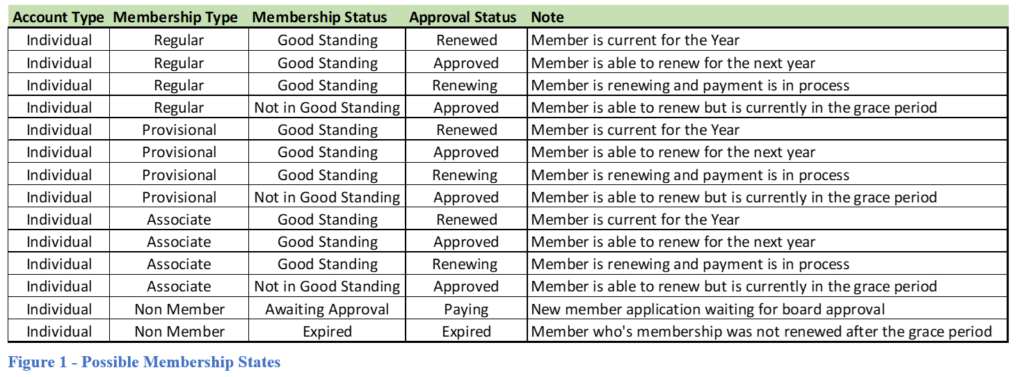
7. Membership State’s
The AAC MRS has many options for users when it comes to the status of any membership. This section will detail all known good Data conditions to ensure that if data were to ever not exist in one of these conditions, something would need to be corrected.